7/07/2014

KVM, enabling virtio after P2V


We run some virtual machines on Red Hat Enterprise Linux (RHEL) version 5 using KVM.

Kernel Virtual Machine (KVM) on Red Hat is managed by libvirt or other management tools to configure, start and stop and maintain the virtual machine. Its an open specification so there are many command line and GUI management tools available.

The tool we use is Convirture, which is a bit like Ovirt or Openstack, in that a MySQL database backends a Web Console for overseeing the creation and management of common resources like shared storage and shared network bridged adapters in order to support high availability migrations of virtual machines between a cluster of host nodes.


So when a virtual machine is created or provisioned, it can be installed using the native installer, or "adopted" by migrating it from a Physical deployment on a dedicated server into a virtual machine. There are tools to assist doing this like disk2vhd for windows or virt-p2v for linux.

useful links:

virt-p2v and virt-v2v
summit talk on libguestfs virt-v2v

Inception -> Super nested KVM -> "Or how I learned to Not Fear the Matrix and Love the KVM"

After the original volumes are converted into raw or other acceptable virtual machine volumes, a virtual machine configuration or set of definition files can be created in order to wrap and support booting the volumes as a new virtual machine.

Initially the virtual machine will only have the drivers included at the time of the original install on the Physical server hardware. Which means the virtual machine "emulation wrapper" must coencidentally emulate hardware, for which, the original Physical volumes had drivers. These are often enough to get the virtual machine to boot, but are not optimum for performance reasons for the operating system in the new virtual environment.

A common relatively open alternative are virtio drivers.

M. Tim Jones,

"virtio was developed by Rusty Russell in support of his own virtualization solution called lguest. Linux is a hypervisor playground. Examples include the Kernel-based Virtual Machine (KVM), lguest, and User-mode Linux. Rather than have a variety of device emulation mechanisms (for network, block, and other drivers), virtio provides a common front end for these device emulations to standardize the interface and increase the reuse of code across platforms.
In full virtualization, the guest is unaware that it is being virtualized and requires no coding changes to work. Conversely, in paravirtualization, the guest operating system is aware that it is running on a hypervisor and includes code changes to make guest-to-hypervisor communications more efficient.
In the paravirtualization case the guest operating system is aware that it's running on a hypervisor, the coding changes are implemented by including virtio drivers that act as the interface between the guest and the hypervisor. The hypervisor implements back-end drivers to support the specialized guest device emulation. These "in-guest" and "in-hypervisor" drivers are where virtio comes in, providing a standardized interface for the development of optimized emulated device access to promote code reuse and increase efficiency.  "

Virtio drivers partner with a version of the Linux kernel that has included support for virtio to bypass most of the emulation layers and provide near bare metal speed to the virtio drivers operating in the virtualized operating system enviroment. Often a speed of at least x10 performance can be obtained.

Virtio drivers for "block devices" or SCSI hard disk drives are available.

Virtio drivers for "net devices" or network adapters are available.

Taking the example of Windows 2008 r2, once it is booted and working under emulation.

We shut it down and created a new disk volume, solely for the purpose of [triggering] a Plug-n-play install of the virtio driver for the new disk volume.

First to create the disk volume with our version of Convirt, we had to drop to the command prompt and execute the following command:

# qemu-img create -f raw elm-2.img 1G

This created a new 1 GB raw disk volume that we could attach to the virtual machine while it was shutdown.

Next we modified the virtual machine [Virtual Machine Config Settings for ELM]  by selecting [ Edit Settings]  and selected the [Miscellaneous] option, so that we could add a virtual machine startup parameter that does not normally exist in most default virtual machine configuration templates.


The parameter to create is "attribute"
drive
Followed by "value"
['file=/vm_vol/vm_disks/elm-2.img,if=virtio,cache=writeback']
Complete with the apostrophes and square brackets.

The content means nothing to the Convirture management system, but is understood by the qemu-kvm invocation that eventually takes place on the target host server to bring the virtual machine into existence.
file = designates the [raw] disk file volume

if = designates the interface or 'bus' the volume will be attached to, the host linux kernel already understands this type of bus and makes it available to the virtual machine

cache = designates the behavior the host takes when the virtual machine attempts to perform a disk io operation, for which there are tradeoffs, if uncertain, do not include it

For the 'guest' operating system, in this case Windows 2008 r2 (which is x64 bit) a virtio driver will need to be obtained and made available to it once it boots in order to add support for the if=virtio bus type.

The most conventional if quaint way of doing this is to provide an .iso file with the drivers included in the image.

You have to be aware and careful to match the virtio client or 'guest' drivers to the virtio support in the linux kernel, mismatches 'may' work, however client drivers that are too advanced of the linux kernel they are demanding service from, may over reach the current feature set of that linux kernel and result in an inaccurate report of driver compatibility, or down right failure to service the client driver.

In otherwords, your windows guest may "blue screen".

So, we are running RHEL v5.10 on this virtual machine host.

There are several sources of virtio client/guest drivers, Fedora, the linux-kvm.org project or Red Hat if you have a current subscription. Even Microsoft offers a links to them Windows Server Catalog

In our case since we are current with Red Hat Subscription, so we navigated to:

https://access.redhat.com/downloads/content/69/ver=/rhel---5/5.10/x86_64/packages

And type in "virtio" into the Filter box to arrive at a download link to the rpm:

virtio-win-1.0.3-0.52454.el5.noarch.rpm

Inside this rpm are many files including

virtio-win.iso
Which can be accessed whether by extracing with 7zip or cpio or rpm2cpio or simply installing the rpm on a host and then tracking down the iso file with an rpm -ql command.

Since this file is intended for guests running on the version of kernel that comes with RHEL v5.10 we can be assured of maximum compatability in our situation.

To get the contents into the guest image, we booted the image using normal procedures and let the plug-n-play process attempt to perform normally after detecting a new interface bus.

However..

It did not install the driver.

So we manually traversed the mounted cdrom iso image inside the virtual machine, located the correct driver for an x64 bit operating system and executed the installation program.


This installed the driver, and indeed opening the Device Manager and checking for a new SCSI device indicates Bus support for the Red Hat Virtio SCSI bus.

However..

It did not bring the attached raw volume online.

To do that the Windows 2008 Manager Storage MMC applet needed to be used to "browse" the attached storage and recognize the volume was detected, but "offline" merely selecting the [tab] to the Left of the drive volume and then "Online" brought it online.


Mission accomplished the virtual machine was shutdown again.

So that the temporary volume could be removed from the virtual machine configuration, and then the two existing [disks] could be converted to [drives] using the if=virtio type.


The completed [Miscellaneous] attribute value pair are the following:

attribute
drive

value

['file=/vm_vol/vm_disks/elm-0.img,if=virtio,boot=on,cache=writeback', 'file=/vm_vol/vm_disks/elm-1.img,if=virtio,cache=writeback']
Take note: The first volume also has [ boot=on ], and the second drive comes up "offline" as well.

Take note: While MPIO is an option for iSCSI, its not something to enable "accidentally" when moving from the "disk" type to the "drive" type in the virtual machine configuration, be sure to [ remove ] the storage entries for the disk file volumes under the Convirture [ Storage ] section, or where appropriate in your virtual machine manager configuration.


After the first boot in this configuration, the second drive will need to be brought online manually.

After this first boot "bring second drive online manually" procedure, on subsequent boots the second drive will be brought online automatically.

Based on my previous experience with VirtualBox and other vm technologies, the cdrom emulation was left on the ATA/IDE bus.


Changing from the default emulation to using virtio for network adapters is a lot easier.

First you can run the .msi Microsoft installer from the cdrom image to pre-install the drivers, in which case when the emulation type of the hardware changes it will simply install from the preinstalled pool of available drivers.

Next you shutdown the machine and then navigate to the [Network] section of the settings and choose to modify (at least in Convirture) the [model] of the bridged network adapter. The drop down provides many emulation  types to choose from, including the [virtio] type.


Restart the virtual machine and the virtio driver will be installed to support the new hardware, the old network adapter and its TCP/IP setting will be gone.

However if you didn't write the settings down, they will still be available for reference in the Controlset in the Windows Registery.

When configuring the new adapter with the old TCP/IP settings, you may find a warning a message that those settings are currently assigned to a "missing" network adapter, and an offer to remove them from that adapter so that they can be assigned to this new adapter. Generally it is okay to do this.

Benefits from virtio drivers will include lower CPU utilization, faster more responsive behavior from the operating system and generally lower memory use.

6/24/2014

ML110 G6, Noisy Cooling Fans

Over the course of several days, I removed a Case and CPU Fan and replaced them in a ProLiant server. Not as easy as it sounds. Silence of the Fans


I comment on the procedure and include numerous digital cell phone photos at the above link.

Essentially the ML110 G6 series is an older generation of a ProLiant server that use to be used for Microsoft SBS or VMware ESX services by many businesses and home labs.

The problem is for a relatively low power TDP of 95 watts its Case and CPU fans are run at very high speed even while at idle, driving the CPU temp down to 30 degrees C.

The Acoustical/Power Savings benefit ratio are not justified.

And they did not provide any means of direct Fan control in either the IPMI bus, BIOS or Operating System through any kind of user interface, user application or documentation. There is a Fan cooling curve, but what its based on or how to influence it are just not documented at all. Leaving many to "guess" effective ways of coercing the Fans to slow their revolutions per minute and to generate less noise.

Through deduction and inductive reasoning and a little luck.

I succeeded in replacing the Fans with quieter fans from Noctua, an Austrian company known for innovative inventions added to their Fans to slow the required RPMs required for the same air flow and cooling capacities.


Windows 2012 NFS, why its not usable

I posted a comment and updated it sometime ago on why the  Windows 2012 Server NFS services option comes up short, when actually trying to use it.

Windows 2012 NFS Service - not quite what's expected

Basically it does not "honor" nor "implement" [NFS Client] assignment of user and group permissions and their propagation. This is somewhat a serious issue, and because the documentation is so very poor on the subject matter at Microsoft. It tends to waste a lot of peoples time uninstalling and searching out a replacement. To be accurate the problem is with the Microsoft product not with clients that attempt to use it.

I discussed the possible reasons "why" they chose not to implement [Full] NFSv3 functionality.. and more or less (mostly not more) implement a derivative protocol which might be loosely "like" Sun Microsystems NFSv4. But is really just an excuse for an unfinished and intractable "problem" with NFSv4.. which most vendors do not strictly try to implement.

As it is.. it remains for all intents practically "Useless". It doesn't even offer the functionality of a plain SMB or CIFS mount.

The only response from Microsoft after a cursory look at the problem, was Microsoft Private Consultant services would have to address the issue. Surprising for such a wide ranging and broadly exposed "feature" in their product.

I don't fault them for failing, but I do fault them for misleading that this is an "NFS service" simply.. it is not a usable NFS service period. At most it is NFS read-only shares.


6/13/2014

ownCloud, Enterprise Edition

I have been experimenting and studying the options with an on premise DropBox "like" solution called ownCloud.

Its a PHP based, typically MySQL database backend service that provides a stable WebDAV file system sync service over http or https.


It started as an OpenSource project at ownCloud.org and its been around for about 4 years.

Recently a full service support company called ownCloud, Inc. has been started which sells consulting and support subscriptions.

What makes it similar to DropBox or Box and different from efforts like TeamDrive (another on premise WebDav sync service) is that the clients are somewhat mature and opensource as well.

The clients can be used in a remote to local sync mode to keep a local copy up to date, or vice versa. Or they can be used to browse the metadata representation of remote files and only download them on command.

Interestingly they also make it possible for the ownCloud service to proxy requests to many remote protocol accessible file systems, like FTP, SCP, SMB again without syncing to a local copy. And any file access to those remote servers maintain their users original file system permissions since to link them tothe users cloudspace they had to provide their original login credentials for that file service.

The ownCloud server is mostly a webserver providing a portal suite of a combination of a homepage and a Left side appbar populated with various ownCloud "apps" installed from an appstore for the ownCloud server.

The central view pane is effectively a mirror of the users "Cloudspace" assigned to them by the ownCloud Administrator. This is like a "Home folder" on many operating systems and acts as a mount "crossroads" for either accessing files stored in the cloud server "Cloudspace" or accessing files stored on "Remote" file server sources across differing fileserver protocol types that are "mounted" on the "Cloudspace".

Files accessible from this "Cloudspace" can be shared with users via weblinks on a time limited/ autoexpiration basis and on demand can created a private password just for that users use. And it even makes sending an email from the ownCloud server to the intended sharee simple.

ownCloud also has both generic LDAP(S) abilities to instantly use exiting domain accounts, even from Microsoft Active Directory, and can access attributes for those users and groups in that domain.

So plugging it into for example a Windows 2008r2 domain is simple.

Its also notable that a user doesn't have to have a special new cloudspace username and account, or have their Active Directory account "decorated" so that the user can use the service. They can be "self enabled" and they can claim their "Cloudspace" service simply by going to the ownCloud server and logging in with the credentials they already use, and with the password they themselves have been using all along, SSO. Facilities for other types of authentication are also available.

In doing this the service "brings" all web authentications to this server rather like a Central Authentication Service (CAS) server and performs the authentication directly against the domain, without exposing the user credentials to any third party. Reducing the attack profile exposure for MiTM vectors.

A few other things are the install for a RHEL or Red Hat system is completely YUM repository based, making upgrades and addressing CVE issues simple.

The clients all use the native installers for their operating system types, desktop or mobile, including Apples App store where necessary.

The C10K problem brought about NGINX and it works with that, as well as Apache and other legacy web servers, including IIS. But because of its nature its best supported on the Linux platform.

Of the database backends SQLite, MySQL, MSSL, Oracle and others are useable, however MySQL seems most appropriate.. and since DropBox uses MySQL for their platform its probably a good bet.

Of the MySQL variants, Drizzle, Oracle MySQL, Percona MySQL or MariaDB it appears any will work, though people will have their preferences. Though DropBox has presented at a Percona conference on MySQL and that might hint it would be a closer bet.

From my research it seems Drizzle is too restrictive in function, Oracle may be passing up some performance increases by focusing on their internal processes absorbing MySQL, Percona MySQL has always appeared performance focused and dedicated to MySQL compatibility now and in the future, while MariaDB may be a bit of a hit or miss proposition as the most "Fedora-like" option trialing new and experimental options.

The PHP options would appear to be 5.3, 5.4, 5.5 and then various ways of getting those repos into RHEL6. Zend-server is also an option.

But it seems clear later versions of PHP with their APC and Memcached options could be very important to scale.

The ownCloud Enterprise Edition feature set seems to take a backseat to stability and reliability with respect to the Community Edition (aka OpenSource Edition).. somewhat like Red Hat releases RHEL for serious use and Fedora for cutting edge use..

Other notable options are that as Windows XP and older OSX versions have been deprecated or desupported the native WebDAV redirectors built into Windows 7 or newer operating systems have gotten much better, and can now map WebDAV shares to "drives" or mount points more reliably.. so those are also viable client options, although a full dedicated client could be better in most cases.. in a temporary capacity from a non home user machine, having the convenience of an SSL mapped file share native to a workstation would be very nice.


5/22/2014

OSX, sharemouse


I'm a big user of InputDirector, use to use Synergy.. now I'm a subscriber to Sharemouse.

Just a quick note on my thoughts here:

1. Free is great
2. Reliable is better
3. Supported is best

I've got nothing against opensource and sharing ideas, but a polished product is worth money, and one that has a road map and delivers on that roadmap, deserves a customer.

Sharemouse is a local lan KVM solution for [bi-directionally] sharing multiple keyboards and mice between multiple attached monitors. With a cut an paste buffer and cut and paste file transfer ability.

Its put out by the same people who offer MaxiVista, which is an IP monitor sharing tool for presentations and extending a desktop.

The licensing seems fair, free is two node and two monitor, standard includes additional nodes and features, professional offers the most nodes and unlimited attached monitors.

It is a lan solution, its not webtop sharing solution.

But it will also protect traffic with a shared password.

One of the coolest things is you can "donglize it" by putting your license key on a portable flash drive and there by "move" it from home to office and back and forth.

You can install sharemouse everywhere, only one device needs to hold a license, and only those nodes sharing a password can connect to each other.

It doesn't support Linux (sad) but Linux supports RDP so well these days if you need a desktop for a Linux server OS.. you can get that, but for the most part I use Linux  as a server host and not a lot of GUI apps.

Drag and drop of files from windows to osx and back works, as does cut an paste of files.


5/19/2014

OSX, extracting active IP and MAC


A bash one liner to extract some useful info


Lists all the interfaces as input to a bash for-each loop, then looks at the ifconfig output for each interface to find an "active" interface, then parses the ifconfig output (again) for the same interface looking for a key, then outputs only the value for that key.

Messy, but useful

I like to think of it as [horizontal] programming as opposed to [vertical] programming.

JMBP13M2012:~ jwillis$ for i in `ifconfig -l` ; do x=$(ifconfig "$i") && x=${x#*status: } && echo ${x%% *} | grep ^active > /dev/null && y=$(ifconfig $i) && y=${y#*inet } && echo ${y%% *} ; done
192.168.2.107

JMBP13M2012:~ jwillis$ for i in `ifconfig -l` ; do x=$(ifconfig "$i") && x=${x#*status: } && echo ${x%% *} | grep ^active > /dev/null && y=$(ifconfig $i) && y=${y#*ether } && echo ${y%% *} ; done
10:dd:b1:e0:1b:4a

sw_vers -productVersion
10.8.5

sw_vers -buildVersion
12F45

x=$(sysctl -a | grep kern.boottime | head -n 1) && x=${x#*= } && echo ${x%% * }
Sun May 18 23:45:53 2014


5/15/2014

P2V, Windows 2008r2 to KVM


Capturing a [live] Windows system while it is running has become trivial with Volume Shadow Copy and Disk2vhd. As long as the Volume Shadow Copy is checked it can even store the captured volume images on one of the disks that is "itself " being captured.


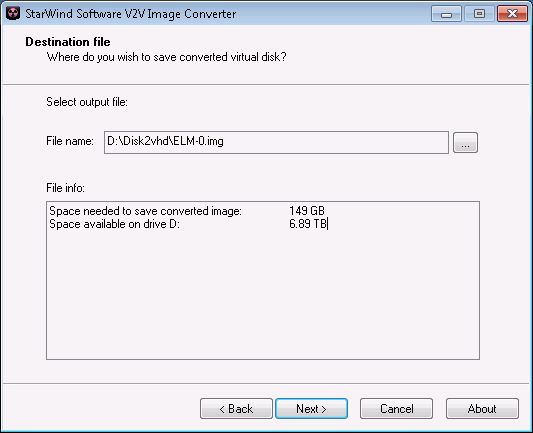
The only restrictions being that VHD is specifically intended for use with Windows 2008r2 or earlier and has a final VHD size limit of 127 GB. That does not not mean the total potential storage space of its contents must be less than 127 GB. You [can] capture a 149 GB disk or partition as long as the resulting VHD does not end up more than 127 GB VHD size limit.

VHDx is specifically for Windows 2012 or above, but Windows 2012 also has tools for backwards converting a VHDx to a VHD as long the resulting VHD does not end up more the 127 GB VHD size limit. VHDx supports up to 64 TB volumes, but partitioning schemes and file systems inside those volumes may have to be divided up into, smaller sizes than the total Volume limiting them something to less than 64 TB. For example an MBR is practically limited to 2 TB. A GPT has larger size limits. But the file system put into those partitions may have their own size limitations.

Once it is in the VHD format, converting it to a RAW image which KVM can use will require a tool.

The traditional  qemu-img  tool "could be used"

qemu-img convert -f vpc -O raw \
/kvm/images/disk/disk.vhd \
/kvm/images/disk/disk.img

however earlier editions of this tool had bugs when working with large VHD files which can result in unusable RAW files.. If you use qemu-img to perform the format conversion, be sure to test the RAW format volume as soon after the conversion as possible to avoid potential data loss from assuming the volume is usable.

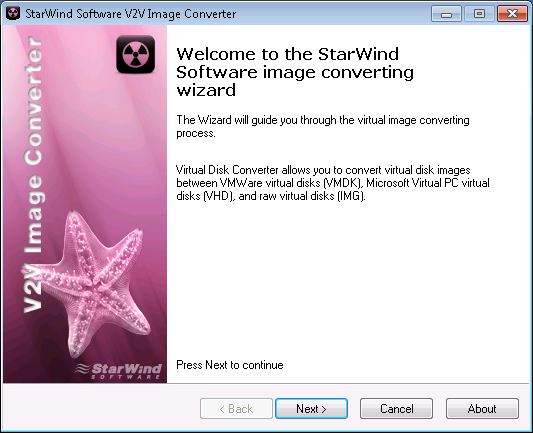
Another tool is the free Starwind V2V image Converter


it actually supports many formats, and helpfully calculates the resulting image size after a conversion. (remember that 127 GB VHD size limit? this tool will warn you if you cross it)

One thing to be "aware of " is that VPC - or "Virtual PC" is a synonym for the VHD file format. So wherever you see Virtual PC mentioned they are referring to the VHD format when speaking about storage.

note: this tool does not support the VHDx  format

RAW volumes are not growable or expandable and converting to this format will result in a larger on disk file system object than the original.

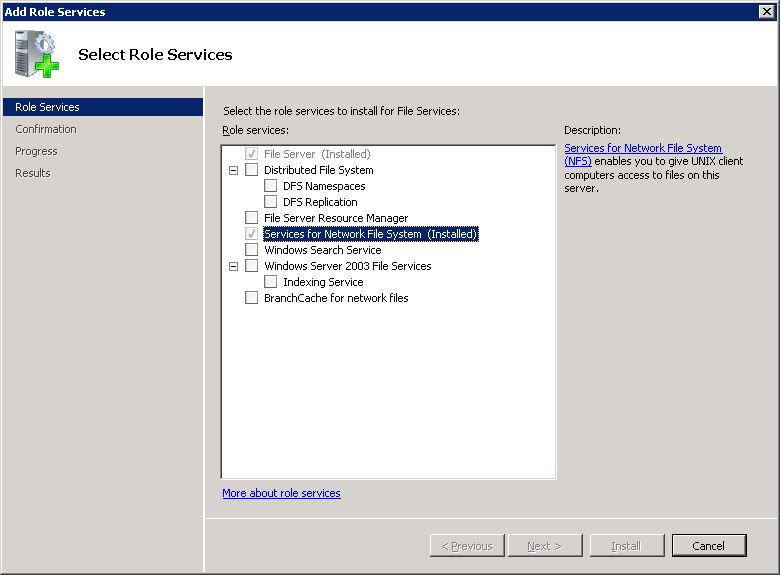
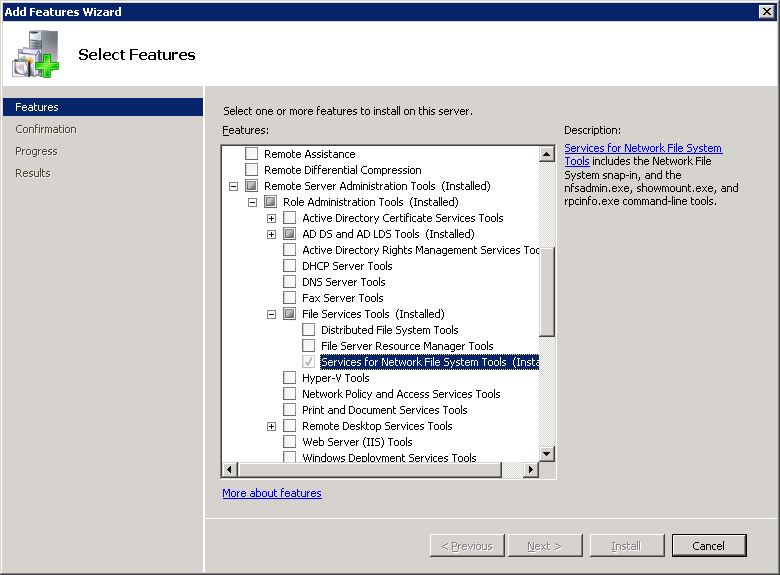
Once this is done getting the raw image file from the Windows system to a Linux host or storage server can be done from Windows 2008r2 by installing the [Services for Network File System] [Role].


And the RSAT [Service for Network File System Tools][Feature]


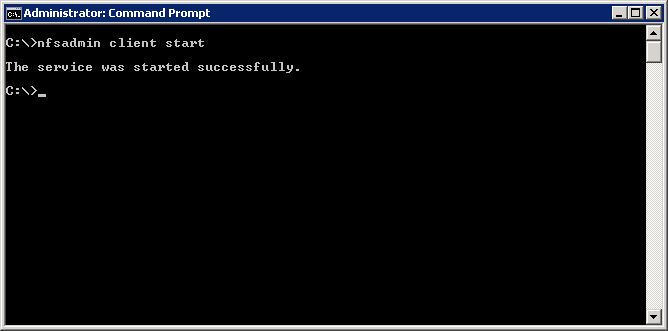
Then "Start" the NFS client service


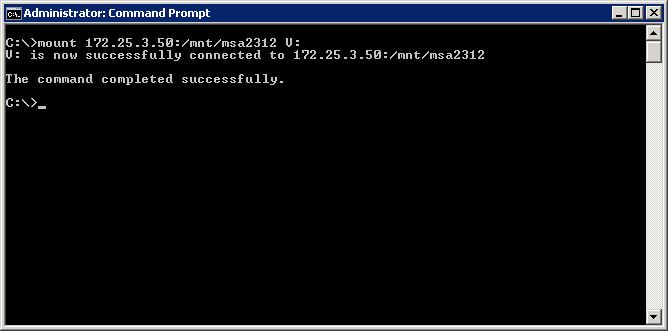
Then "Mount" the Linux NFS share


And copy the raw image file from the Windows system to the Linux host or storage system

Additional details might include setting up the Linux exports to

1. allow the IP address of the Windows server to mount the exported share

2. allow no_root_squash such that an anonymous user can read write from that Windows server

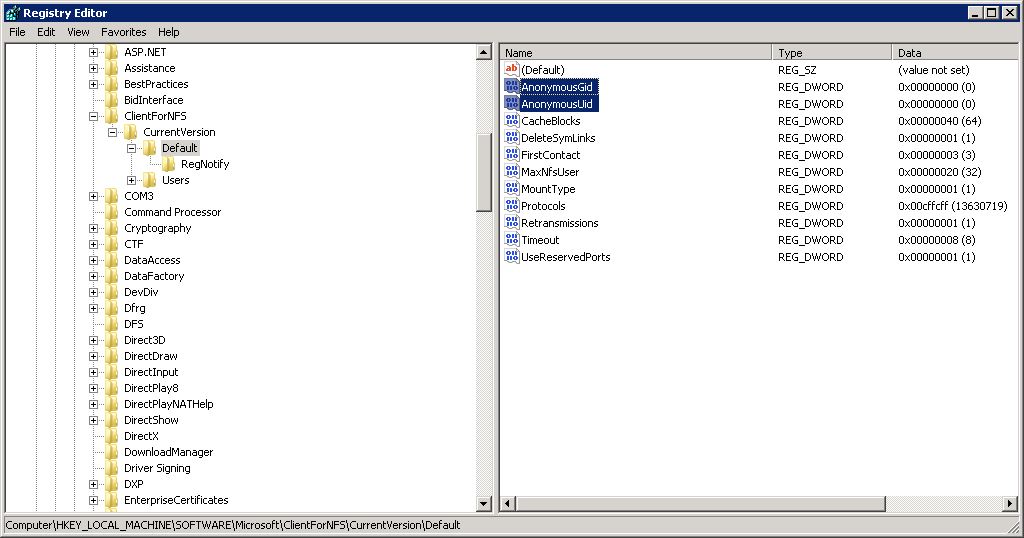
3. Set a Windows registry setting to map the Windows "pseudo UID and GID" for the Anonymous user if not using AD user mapping (it defaults to -2 and -2, somewhat like Mr. Nobody and the Root Squash problems.. but enough about errant vegetables..)


4. if your Linux KVM system is using the luci and rcci clustering solutions, you will need to login to the luci web control and configuration for the cluster - then add a new nfs client "resource" - then add that newly created "nfs client resource" as a [child] to your cluster "nfsexports" service

5. any "Error 53" messages from Windows will indicate "path not found or resolved" which - might be true - but its the bit bucket for errors, it could mean many things, like simply "Access Denied" because the exports file does not have a pattern to grant access to the Windows server IP address, or the permissions for Anonymous mounting from that IP address, or the UID/GID is unknown - any problems reading/writing after mounting are likely due to no_root_squash or the automatic assumption that UID/GID "0" should be treated at the 65536 "nobody" user with few permissions (there are not a lot of logs or diagnostics for nfs on the Windows or Linux, since Linux will often default to "NFS3" and uses UDP which isn't very chatty about problems.. "NFS4" has even more advanced "issues" but might offer a performance boost if you have the experience to get it working properly, changing up the read/write buffers on the mount options from Windows for the nfs mount might be a more efficient use of time. You can also capture the traffic with wireshark and let it decode the nfs data packets to gleen useful information from the nfs protocol error messages.